minoli brings attention back to what is useful now.
An ADHD-friendly organization app for adults
Less on your mind.
One step at a time.
minoli turns what’s weighing on you into a simple next step. Start, move forward, and make a little room. All on your iPhone.
✓ Nothing leaves your iPhone✓ No account✓ Real help when you stall
One small step. A whole new feeling.
The list isn’t the problem. The first step is.
minoli is an iPhone organization app for adults who struggle to focus, to get started, or who are simply carrying too much. An ordinary list just stores your tasks and leaves you alone in front of the biggest one. minoli does three more things.
It breaks tasks down into steps of a few minutes, down to a first action you can take right now. It prioritizes for you and explains in one line why this one comes first. And above all, it gets you unstuck: when nothing starts, it offers a way out matched to whatever is actually in the way.
This works with or without an ADHD diagnosis. minoli does not diagnose or treat anything: it is an organization app, and you can edit or ignore anything it suggests.
Breaking tasks into subtasks
“Prepare the presentation” is not an action.
It is ten decisions before you start.
Which file to open, which part first, for how long. That fog is what pushes the task to tomorrow. minoli replaces it with a short sequence of concrete steps you can rewrite at any time.
✓A clear first action without planning the whole project
✓Steps concrete enough to know what to do now
✓A visible finish so the task does not stay open forever
✓An editable breakdown when the situation changes
What other apps don’t do
A list tells you what to do.
minoli stays with you when you can’t.
The “I’m stuck” button shows no motivational quote and no extra reminder. It starts from what is making the task difficult and adapts the next step to the situation.
minoli turns the start into something immediately doable.
minoli adjusts the effort without making you lose the thread.
Support that fits what is really getting in the way. minoli adjusts its suggestions to the situation and to what helps you move again. This personalization stays entirely on your iPhone and can be reset at any time.
How it works
From a busy mind to a first step.
Put down what’s on your mind. minoli makes the next step simpler.
01Capture
Clear your head.
Write or say what comes to mind. No sorting, no need to know where to start.
02Clarify
Find your first step.
minoli breaks down your tasks and brings forward an action small enough to start.
03Begin
Go at your own pace.
One step at a time. And if you get stuck, minoli helps you find another way forward.
Inside the app
From everything in your head
to what you can do now.
Six real moments inside minoli. Capture, clarify, start — and change approach when you get stuck.
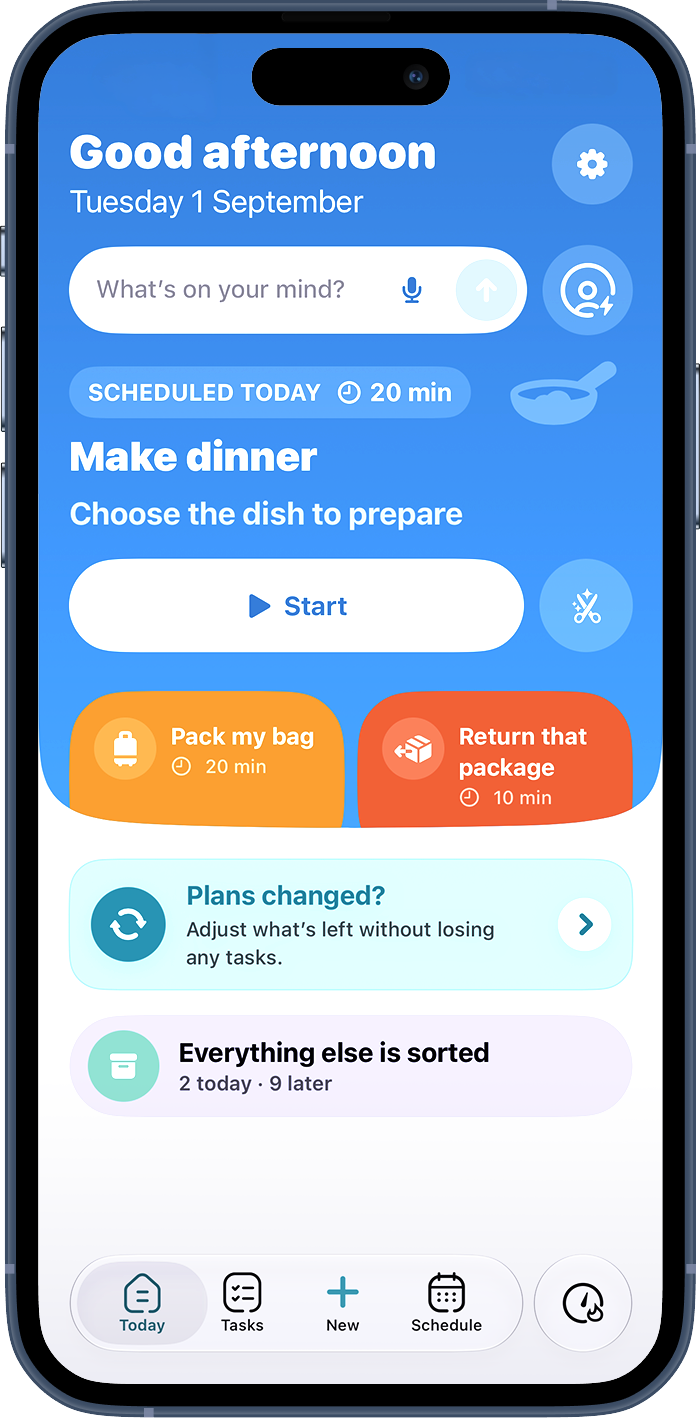
01 · Today
One next action.
One next action.
Not the whole list.
minoli brings forward what is useful now, explains why, and keeps the rest quiet.
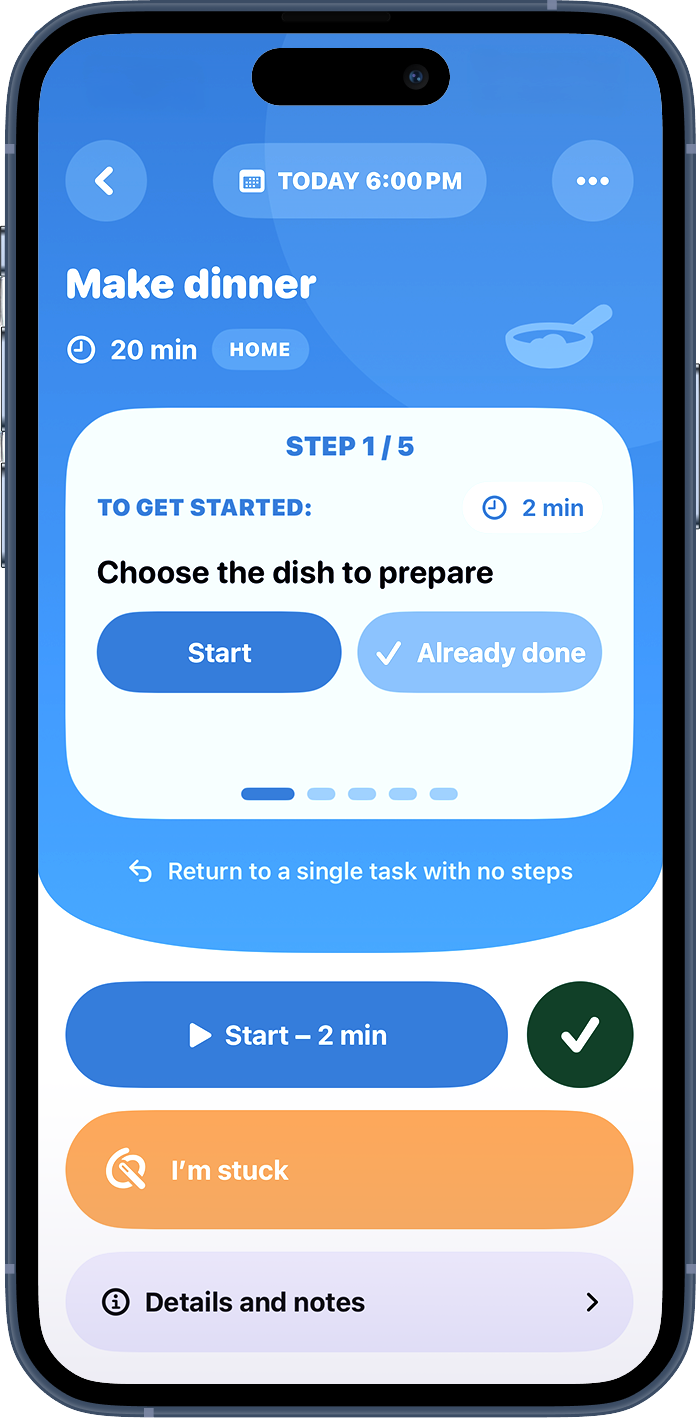
02 · Mind dump
Drop it in messy.
Drop it in messy.
Clear actions emerge.
Type or dictate without sorting. minoli turns what it can into clear, editable actions.
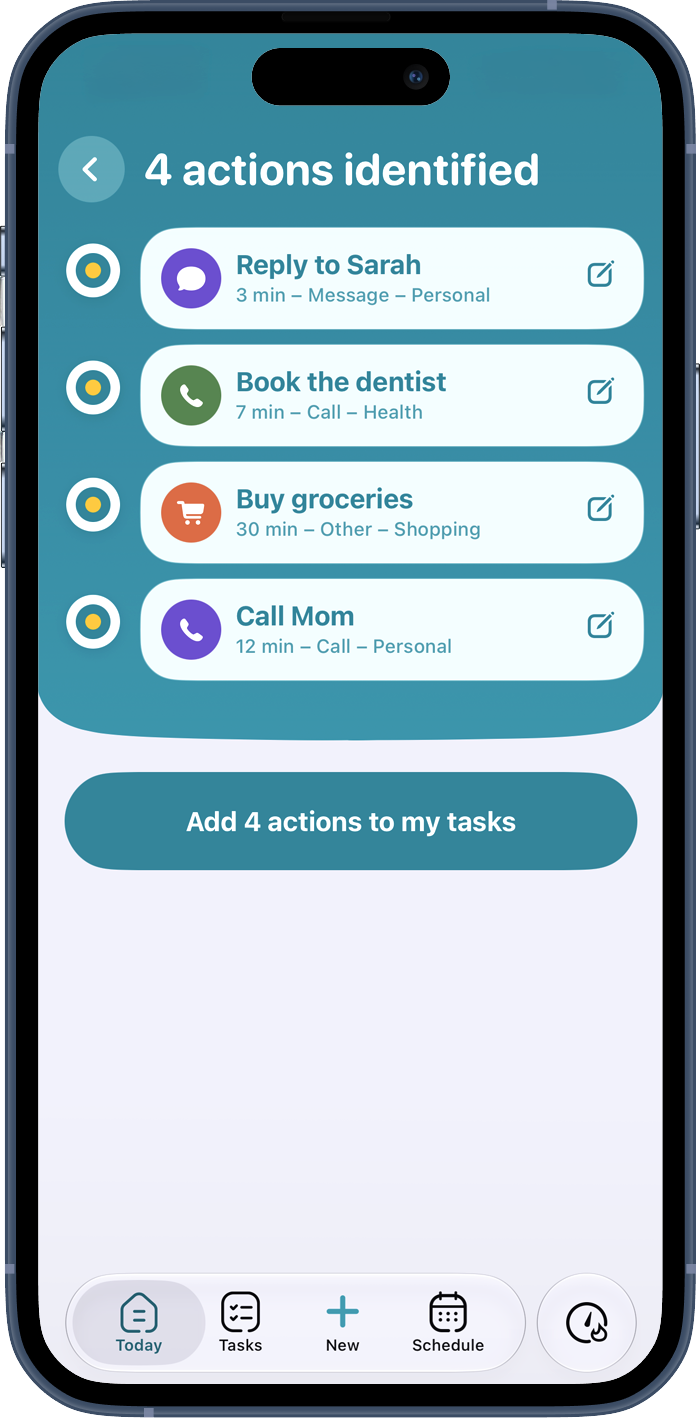
03 · Micro-steps
The start becomes small enough to begin.
A vague task becomes a short sequence. The first step here takes two minutes.
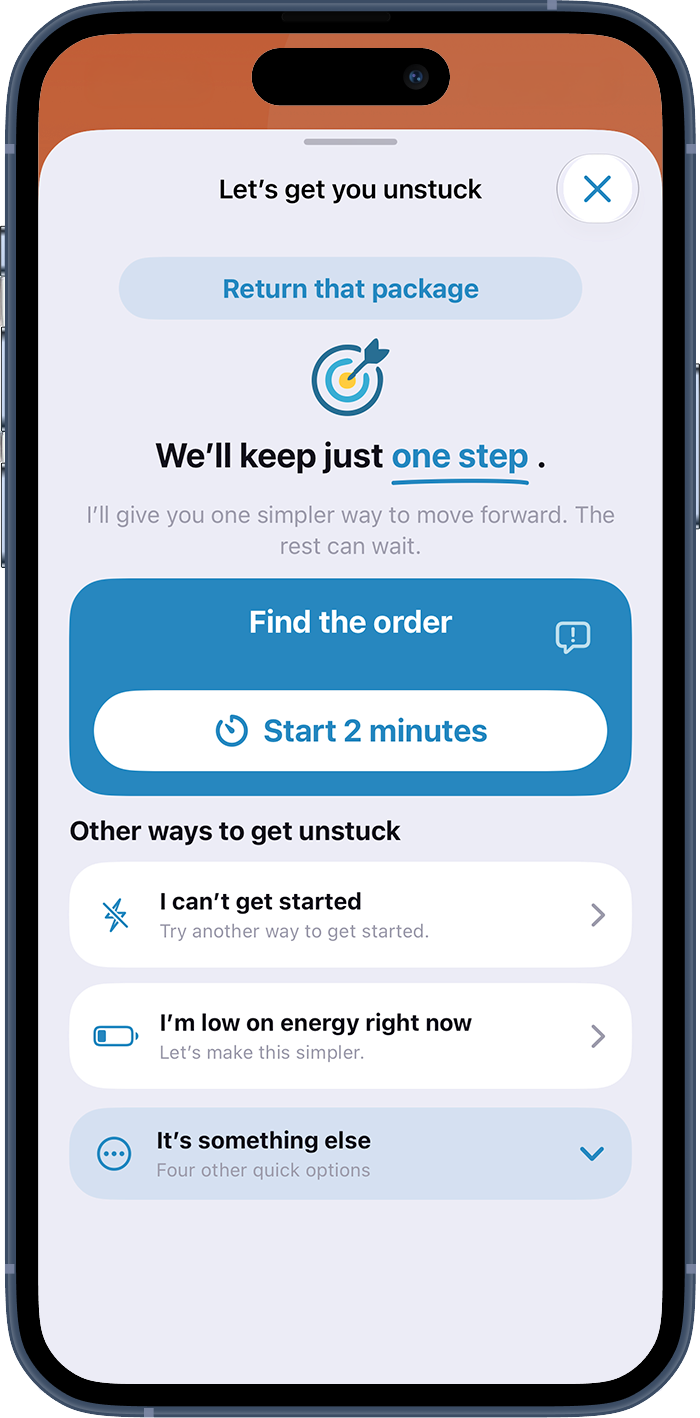
04 · Get unstuck
When this way doesn’t work, try another.
Keep one step, lower the effort, or change the starting point: the help adapts to what is actually in the way.
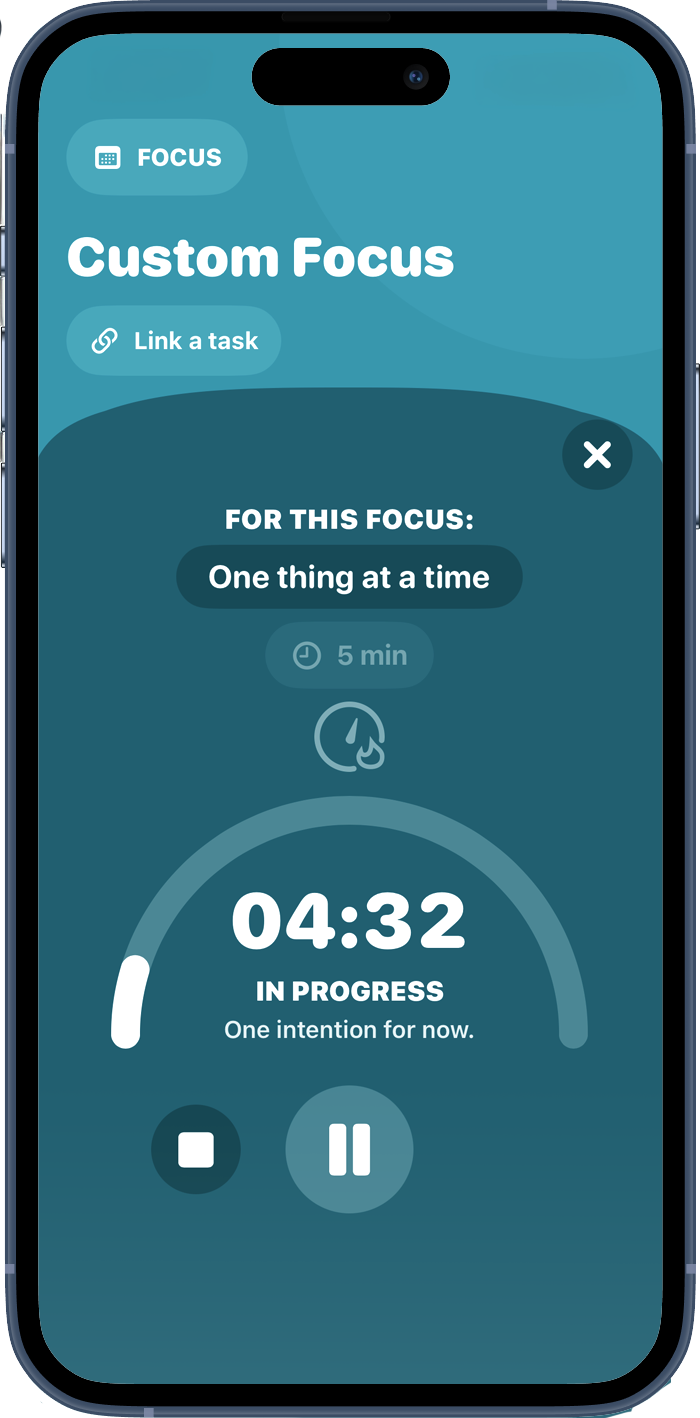
05 · Focus
One thing at a time.
One thing at a time.
The rest can wait.
A short timer, one visible intention, and fewer distractions to stay with the step in progress.
06 · Calendar
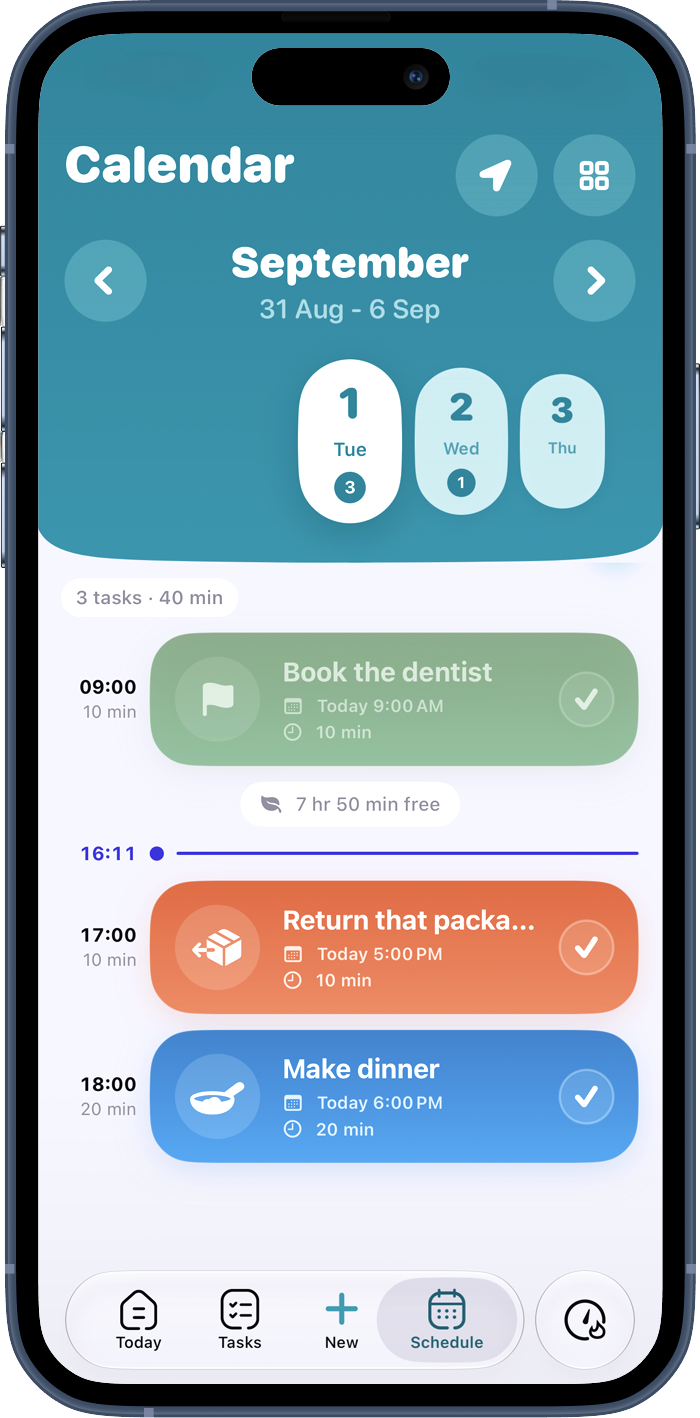
See what actually fits in your day.
Tasks find their place around your commitments, with your free time still visible.
Private by design
Other apps send what you write to their servers.
minoli has no server.
The breakdown, the prioritization and the unblocking help are all computed on your iPhone. Your rawest thoughts, your overdue items, the things you keep stalling on: none of it goes anywhere else. No account, no advertising, and iCloud backup only if you turn it on — in your Apple account, not ours.
No account
No profile to create, no email address to hand over. You open the app and write.
No ads
No ad trackers. Your tasks are not used to target anyone, starting with you.
All of it runs on your phone
Sorting, breaking down and unblocking all run on the device, offline included. Nothing passes through a remote analysis service.
Practical guides
Less theory.
One useful first action.
Concrete answers for the moments when nothing gets started.
Mental load
How to do a brain dump that leads to action
Empty your head without ending up with a longer list.
Read the guide → Getting startedHow to start a task when you feel stuck
Work out what to do first when “just do it” does not help.
Read the guide → Micro-stepsHow to break down a task without overplanning
Split it just enough that you can begin.
Read the guide → ClarityHow to reduce mental load every day
Get reminders out of your head and decide what actually needs doing.
Read the guide → RoutinesBuild an ADHD routine that stays flexible
A short sequence that holds up on bad days.
Read the guide → OrganizationHow to choose the best ADHD app for your needs
What to look for in a list that helps you act, not just store things.
Read the guide →Frequently asked questions
What you may want to know before you start.
If you are looking for an ADD app to capture tasks, choose a priority and get started, you can try minoli with or without a diagnosis. ADD is an older term still used for attention difficulties, especially inattentive ADHD. minoli is an organization tool, not a diagnostic tool or treatment.
The best ADHD app depends on what gets in your way: remembering, choosing a priority or starting. If starting is hard, look for small editable steps and help when you get stuck. minoli is one iPhone option for these needs. Check whether the app stays easy to reopen after a day away.
More on choosing an ADHD to-do list →minoli turns a vague task into editable steps that are concrete enough to act on. The next step stays clear, and you can adjust the breakdown at any time.
More on breaking down a task →minoli starts from what is making the task difficult and offers support suited to the situation. The aim is to find a possible next action, without guilt or generic motivational lines.
More on task-initiation difficulty →minoli considers the context of the day, the task’s constraints and your progress to suggest a useful action for now. The app explains its choice simply, and you can always choose something else.
Abandoning an organization app is common, and it is usually the tool that asked for too much upkeep. minoli assumes you will step away: nothing piles up as overdue, no streak breaks, and a missed day creates no catch-up. Reopening the app shows you a step, not a report card.
Shrink the task to a two-second move: open the document, get your things out, write the title. The point is to start, not to finish.
More on task-initiation difficulty →Write it all down, jumbled, without sorting. Only then separate what needs doing from the rest, and pick one task to start with.
More on the brain dump method →First write down what it looks like when it is finished. Then split it into actions that start with a verb: “open,” “call,” “send.” Each step should fit in a few minutes.
More on breaking down a task →Hook it to a fixed moment in your day rather than a clock time, keep the steps few, and prepare a short version for days with no energy. A missed day should not pile anything up.
More on flexible ADHD routines →Yes. minoli does not send your text or your tasks to a server: the breakdown, the prioritization and the unblocking help are all computed on your iPhone, offline included. No account, no advertising, no trackers. The only copy outside the device is the iCloud backup, in your own Apple account, and only if you turn it on.
Read the privacy policy →No. minoli is an everyday organization tool. It does not diagnose ADHD and does not replace an assessment, professional advice or treatment. If difficulties are having a significant or lasting impact, a qualified health professional can help assess them.

One step, not another list.
The next step is smaller than you think.
Start free on iPhone. minoli breaks it down, prioritizes and gets you unstuck — on your phone, without an account. Keep what helps, ignore the rest.

On iPhone, in English and French.